
AWeber: Streamline Email Marketing with Automation
Overview
AWeber is a comprehensive email marketing platform designed to help businesses create and manage profitable customer relationships through targeted communication. The software enables users to build email lists, automate outreach, and maintain consistent engagement with current and potential customers. It is tailored for small to medium-sized enterprises, online entrepreneurs, and marketing professionals who rely on email as a core channel for growth and customer retention.
By integrating with popular tools such as WordPress, Shopify, Facebook, PayPal, Salesforce, and Zapier, AWeber streamlines workflows across multiple digital ecosystems. This integration capability reduces manual data entry and supports scalable operations. Real-world use cases include launching automated welcome series, managing subscriber segmentation, and tracking campaign performance directly within the platform.
The developer did not provide additional background on the company’s history or organizational structure. However, the software’s widespread adoption by over 120,000 businesses indicates a proven track record in delivering reliable email marketing solutions. It serves as a central hub for managing email campaigns, ensuring consistent messaging and improved customer engagement across diverse business models.
Key Features & Capabilities
- Email List Building: Create customizable signup forms and landing pages to grow your subscriber base efficiently.
- Automated Campaigns: Design and deploy automated email sequences triggered by user actions, such as signups or purchases.
- Multi-Platform Integrations: Connect with over 30 services including Shopify, WordPress, Facebook, PayPal, and Salesforce for seamless data flow.
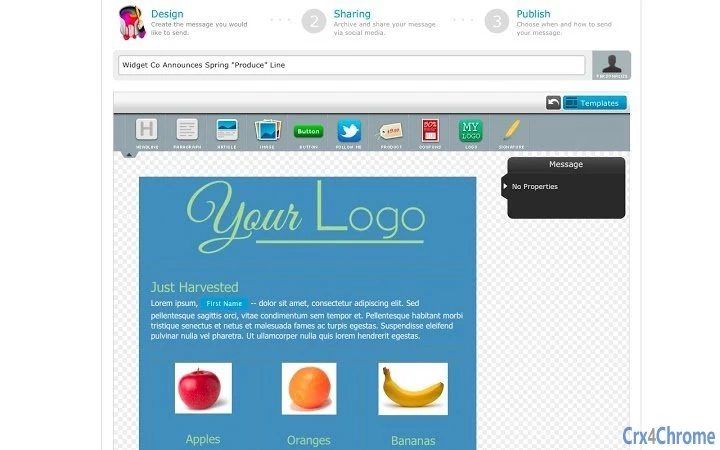
- Drag-and-Drop Editor: Build professional-looking emails without coding, using intuitive design tools.
- Analytics & Reporting: Monitor open rates, click-throughs, and subscriber behavior to refine future campaigns.
These features support practical workflows such as setting up a welcome email series after a new user signs up, automatically sending discount offers to inactive subscribers, or syncing customer data from an e-commerce store to personalize messages. The automation tools help reduce manual effort while increasing campaign precision and response rates. For digital marketers, the ability to integrate with tools like Zapier and Gravity Forms allows for deep customization of business processes.
User Interface, Workflow & Performance
The user interface is structured around a clean, task-oriented dashboard that organizes core functions like list management, campaign creation, and automation workflows. Navigation is intuitive, with clearly labeled menus and step-by-step wizards guiding users through setup processes. The drag-and-drop email editor enhances usability, enabling even non-technical users to design visually appealing messages.
Workflow efficiency is enhanced by the software’s integration-first approach, allowing users to trigger actions across platforms with minimal configuration. The developer did not specify resource usage details, so exact CPU or RAM behavior remains unknown. However, general software behavior patterns suggest stable performance during typical operations such as sending bulk emails or managing large subscriber lists.
Stability appears to be maintained through regular updates and a focus on uptime for core services. No performance benchmarks or system load data were provided. Users can expect consistent access to tools, though actual responsiveness may vary based on internet connection speed and the complexity of campaigns being managed.
Compatibility & System Requirements
AWeber is available for Windows, Mac, and Linux operating systems, offering broad accessibility across different computing environments. The software has a file size of 500 MB, indicating a moderately sized application that includes necessary libraries and tools for full functionality.
Exact system requirements were not listed. The developer did not specify minimum CPU, RAM, or storage needs. Compatibility information is limited to the supported platforms. Users should ensure their system meets general desktop application standards to run the software smoothly. For optimal performance, it is recommended to use a modern system with up-to-date operating system versions.
Pros and Cons
Pros
- Extensive integration with popular business tools and platforms
- Powerful automation features for email campaigns
- Intuitive drag-and-drop email editor for non-technical users
- Free access with no cost to start using core features
- Supports multiple operating systems including Linux
Cons
- Exact system requirements not provided by the developer
- No information on resource usage or performance under load
- Limited details on update frequency or release cycle
- Platform-specific installation steps not specified
- Security protocols and data handling practices not disclosed
FAQ Section
Is AWeber compatible with my operating system?
AWeber is designed to run on Windows, Mac, and Linux systems. Specific installation instructions for each platform were not provided.
Is the software secure to use?
The developer did not disclose details about data encryption, privacy policies, or security measures in place.
How often are updates released?
Information about update frequency or release schedule was not included in the available documentation.
Can I use AWeber offline?
As a cloud-based email marketing platform, AWeber requires an internet connection to function. Offline usage is not supported.
What type of license does AWeber use?
The software is available for free, but the license type and terms of use were not specified in the provided information.
Final Thoughts + CTA
AWeber stands out as a robust, accessible email marketing solution for businesses aiming to strengthen customer engagement through automation. Its broad integration network, user-friendly design, and free availability make it a compelling choice for startups and small teams. While some technical details remain unspecified, the platform’s core functionality is well-aligned with modern marketing needs.
Those who manage email campaigns across multiple platforms—especially e-commerce, content creators, and digital marketers—will benefit most from its automation and integration features. Despite the lack of detailed system requirements and performance data, the software’s widespread use suggests reliability and scalability.
Download AWeber now and start building lasting customer relationships with powerful, automated email marketing.







